Auto-Browse on Android: When AI Visibility Becomes Transaction
Chrome auto-browse hits Android in late June 2026. Your booking form is the new SERP. Eight failure modes that cost zero human conversion but lose every agent booking.
By Springvanta
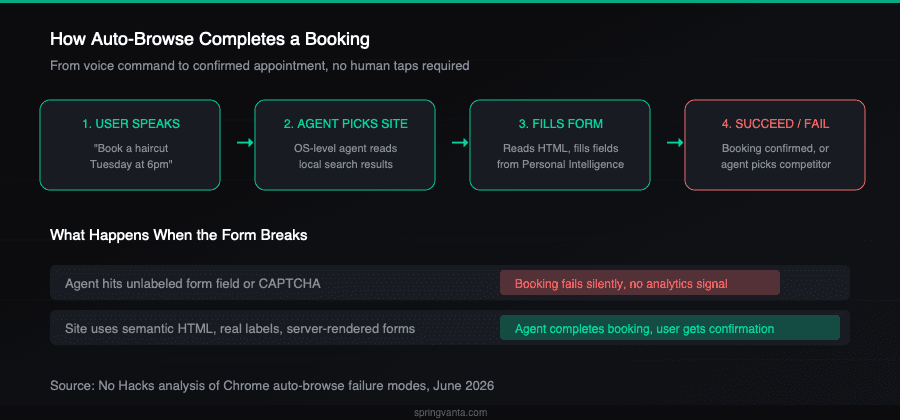
Late this month, a Pixel 10 user will say "book me a haircut Tuesday at six" and an OS-level agent will pick a salon, navigate its website, fill the form, and confirm the appointment. If the form has an unlabeled field, a CAPTCHA, or a calendar that loads only after JavaScript hydration, the agent will fail. It will pick the next salon on the list. The first salon will never know it lost the booking.
Google announced on May 12 that Chrome auto-browse, its agentic browsing feature, lands on Android phones starting late June 2026. The first wave covers Samsung Galaxy S26 and Google Pixel 10. AppFunctions, the underlying agent-to-app API, is projected to reach 200 million Android devices by year-end. Auto-browse has been running on desktop in preview since January. The mobile launch is the one that matters, because it is not an app or a browser extension. It is baked into the operating system.
What auto-browse actually does
Chrome auto-browse uses Gemini 3's multimodal capabilities to read pages, identify interactive elements, fill form fields, navigate multi-step flows, and complete transactions. It can book appointments, reserve parking, file expense reports, renew licenses, and run comparison shopping. It draws from Google Password Manager and Personal Intelligence for user data. It pauses for explicit confirmation on purchases and social posts.
Pricing: Google AI Pro at $19.99/month covers 20 tasks per day. AI Ultra at $249.99/month covers 200 tasks per day. The tier structure tells you who Google expects to use this most: people delegating routine local-service bookings, not power users running complex research workflows.
Slobodan Manic at No Hacks laid out the architecture clearly: each Google move over the past six months has been a layer of a single stack. Chrome auto-browse is the distribution layer. Universal Commerce Protocol is the commerce layer. Agent-to-Agent protocol is the identity layer. Gemini Nano 4 handles on-device inference. web.dev's "Build agent-friendly websites" guidance tells developers what the agent expects to find. Read alone, each piece looked like a product update. Stacked, they form the operating layer of the agentic web on the dominant mobile platform.
TechCrunch confirmed the Android Show details: the agent ships with Gemini Intelligence, which Google describes as Android moving "from an operating system into an intelligence system." It has system-level permissions to navigate apps, read the screen, accept notifications, and access the password manager. No third-party app gets those permissions.
Why OS-level integration changes the stakes
Every prior consumer AI agent has been an app. ChatGPT, Claude, Perplexity, even Gemini until now. Apps compete for installation and screen time. They depend on the user remembering to open them.
An OS-level agent does not need to be opened. It is available the moment the user picks up the phone. Default availability on hundreds of millions of devices is not the same as being the most popular app. It is closer to what default search has been for desktop browsers for two decades. Whoever owns the default owns the traffic.
This is not hypothetical. Google's own data puts AI Mode at more than 1 billion monthly users with queries more than doubling every quarter, as reported by Tech Insider. The search box was already replaced with "Ask Google" on Android in April. The agent layer is the next step in the same arc.
Eight ways your booking form kills the agent
Manic's analysis clusters auto-browse failure modes into eight categories. Each one is a pattern that costs zero conversion under human traffic but can lose the entire booking under agent traffic.
Client-side rendering. If the booking form, calendar widget, or call-to-action button renders only after JavaScript hydration, the agent sees an empty shell. Visual site builders (Figma Sites, Bubble, Wix Studio, Lovable's default React setup) are particularly vulnerable. Their forms are invisible to the agent.
Cookie walls. A cookie banner that obscures all content until the user clicks Accept introduces a step the agent might fail. Some agents handle it. Some do not. Some click Accept on terms the user has not seen, which is a separate problem.
Unlabeled form fields. A field without an associated label element or aria-label is invisible to the agent. It does not know whether to put the phone number, the email, or the name there. Across a five-field form the failure compounds.
Div-based buttons. A div styled to look like a button is not a button to the agent. It reads HTML semantically. If the "Book now" element is not a real button or anchor, the agent skips it.
Modal traps. A modal with a close button hidden behind a CSS hover state, or a calendar popup the agent cannot dismiss, breaks the flow with no recovery path.
CAPTCHA. A CAPTCHA on the booking form is a hard stop. The agent will not solve it. The booking fails.
Slow page loads. Mike King's retrieval-eligibility research from April showed page-load time as a hard cutoff for AI retrieval, with 499 status codes appearing where the agent gave up. Auto-browse inherits the same constraint, sharpened by mobile latency.
Sign-in walls. Google Password Manager helps where the user has saved credentials. Without them, the agent stops. For local business bookings, sign-in walls are a common pre-action blocker.
The audit is the same one accessibility teams have run for a decade
Here is the part that should make this actionable rather than alarming. The fix for every one of these failure modes is the same fix accessibility audits have recommended for years. Real label elements. Real button elements. Server-rendered forms that work without JavaScript. No content hidden behind interaction walls.
Google's own web.dev agent-friendly guidance, published in April, makes the convergence explicit. Every one of Google's seven agent-readability rules maps to an existing WCAG recommendation. The audit is not new. The visitor class is new.
Open your booking flow on a phone in Chrome. Disable JavaScript in dev tools. Reload. Can you see the form? Can you see the buttons? Can you complete the booking with keyboard only? If yes, the agent can do it too. If no, the agent cannot, and the booking goes to the next business on the list.
The Search Console AI performance reports Google launched on June 3 give you visibility into impressions inside AI Overviews and AI Mode. What they do not give you is any signal when an agent tried to book on your site and failed. There is no "agent timed out on your booking form" notification. The traffic that did not arrive is invisible. Three months later, the owner notices bookings are down and cannot identify the cause.
Sources: No Hacks, TechCrunch, Google Blog, Google Search Central Blog, web.dev, digitalapplied, Search Engine Roundtable