Coding Agents Got Orchestration, Cost Tracking, and Workflow Integration in 72 Hours
Vercel AI SDK 7, GitHub Desktop 3.6, and VS Code 1.126 each shipped a different layer of coding agent infrastructure between June 24-26. Here is what changed and why it matters.
By SpringVanta
Three things shipped between June 24 and June 26 that, on the surface, have nothing to do with each other. Vercel released AI SDK 7 with 16 million weekly downloads. GitHub updated its Desktop app. VS Code shipped version 1.126.
Look closer and they share one thesis: coding agents are no longer chat features. They are infrastructure that needs orchestration, cost governance, and workflow integration.
Vercel AI SDK 7: agents as swappable backends
The headline feature in AI SDK 7 is HarnessAgent. It lets you programmatically run established coding agents (Claude Code, Codex, Pi, OpenCode) through a single TypeScript API. Configure each one independently, swap one for another without touching your integration layer, and pipe the output through the same useChat() hook you already use for chat UIs.
This is the SDK with 16 million weekly npm downloads. When Vercel ships an abstraction, a lot of TypeScript codebases follow.
The deeper bet is in the harness adapter spec. Each agent runs in a sandboxed workspace, can be parked and resumed, and individual turns can be interrupted mid-flight. That is not how you treat a chat assistant. That is how you treat a service.
The SDK also adds WorkflowAgent for durable agent execution that survives process restarts and deploys. Tool approvals with HMAC-signed signatures to prevent forged approvals. Timeout configuration at the total, per-step, per-chunk, and per-tool level. None of this is about making agents smarter. It is about making them production-safe.
MCP Apps are part of the release too: MCP servers can now expose sandboxed iframe UIs alongside their tools, separating model-visible tools from app-only tools. The model gets the tools it needs; the user gets an interface for review and configuration.
For anyone building custom agent workflows in TypeScript, AI SDK 7 is now the most complete toolkit available. The harness abstraction means you can write your integration once and change the agent underneath without rewriting the plumbing.
GitHub Desktop 3.6: Copilot enters the full Git workflow
GitHub Desktop 3.6, shipped June 26, migrated Copilot to the Copilot SDK — the same shared foundation behind enhanced commit messages and a new AI-assisted merge conflict resolver. Copilot now reads your .github/copilot-instructions.md and AGENTS.md files and honors repository-level commit metadata rules.
Every Copilot feature in GitHub Desktop now has a model picker. You can BYOK a third-party provider or a local model. That model picker is the quiet part: GitHub is saying the AI model behind your Git operations is your choice, not theirs.
The worktree support matters more than it looks. Git worktrees let you work on multiple branches simultaneously without stashing, switching, or cloning. GitHub explicitly frames this as useful "alongside coding agents, which often spin up worktrees to run isolated, parallel sessions." The GUI Git client from the world's largest code host is now designed around the assumption that you are running parallel agents.
That is a meaningful shift. The tool that used to serve one developer at one keyboard now assumes multiple agents working on different branches at the same time.
VS Code 1.126: cost tracking and parallel agent chats
VS Code 1.126 shipped June 24 with session-level cost tracking for Copilot chat. You can now see the total cost of an entire chat session, not just individual turns. Microsoft's own framing is blunt: this exists because Copilot's June 1 switch to token-based billing caught developers off guard.
The numbers behind that billing switch are painful. One developer reported a projected $180 bill on day one. Heavy agentic users saw costs jump from $29 to $750 per month. In extreme cases, $50 became $3,000. A Pro+ subscription at $70/month includes 7,000 AI Credits, where one credit equals $0.01. That is roughly five to seven days of heavy agentic work. A single complex Opus session runs $0.50 to $2.00. A developer doing a full day of agentic work burned 360 credits in one sitting.
VS Code 1.126 also adds multi-chat agent sessions: multiple simultaneous chats within a single agent host session, sharing working context but maintaining independent threads. Run one agent implementing a feature while another investigates a bug, in the same session window. Conversations persist across window reloads.
The cost tracking and multi-chat features are two sides of the same coin. You need parallel agent sessions to be productive, and you need session-level cost visibility to avoid bankrupting yourself with them.
What the convergence means
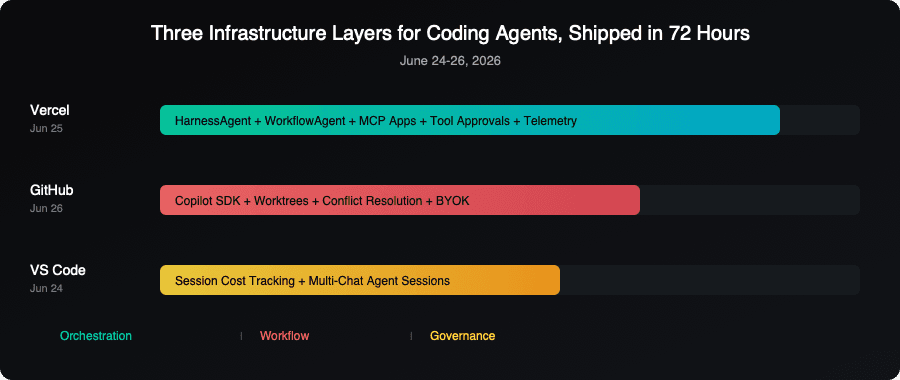
Each platform solved a different piece of the same problem. Vercel built the orchestration layer (how you run and swap agents). GitHub built the workflow layer (how agents participate in Git operations and parallel branch work). VS Code built the governance layer (how you track what agents cost and manage multiple at once).
If you are evaluating AI coding agents for your team, the practical questions have changed. It is no longer just "which agent writes the best code?" The questions are now:
Can you orchestrate multiple agent types? Vercel's HarnessAgent says yes, with a unified API. If your team uses Claude Code for some tasks and Codex for others, the plumbing now exists to swap between them programmatically.
Can agents work in your existing Git workflow? GitHub Desktop 3.6 with worktree support and Copilot-powered conflict resolution says yes. Agents can commit, resolve conflicts, and work on parallel branches through a GUI that was built for humans.
Can you see what agents cost? VS Code's session cost tracking says yes, but the underlying economics are rough. A Pro+ plan covers maybe a week of heavy agentic use. You need to know which sessions are expensive and why, and now you can.
The providers are racing to build the scaffolding around agents, not just the agents themselves. If you are picking tools today, weigh the infrastructure around the agent at least as heavily as the agent's code quality. The model you choose today may not be the best one in three months. The orchestration, cost visibility, and workflow integration you build around it will outlast any single model choice.
Sources: Vercel AI SDK 7 blog post, GitHub Desktop 3.6 changelog, VS Code 1.126 release notes, byteiota VS Code cost analysis, Vercel HarnessAgent changelog.