68% Zero-Click, Agents in the OS, and Bookings You Cannot See
Three June 2026 signals converge: 68% zero-click searches, Chrome auto-browse baked into Android, and delegation search. Businesses that are not agent-ready will lose boo
By Springvanta
Three numbers landed in the same week, and together they say something none of them says alone.
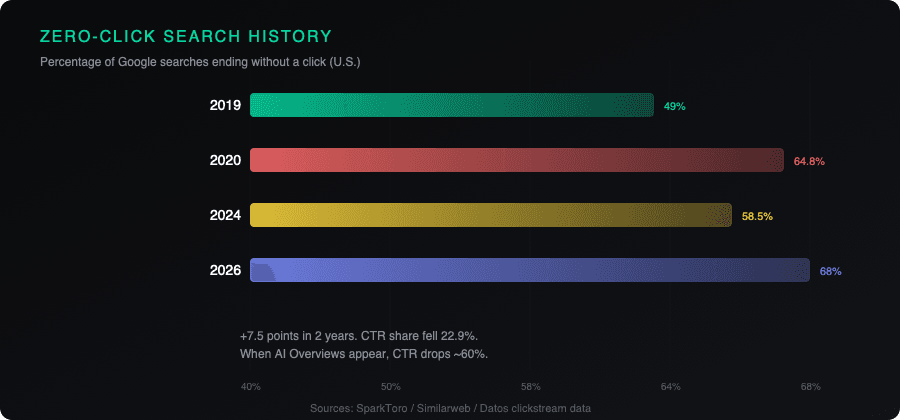
On June 9, SparkToro published its latest zero-click study. 68.01% of Google searches in the U.S. ended without a click between January and April 2026. That is up from 60.45% in 2024, a 7.5-point jump in two years. The share of searches generating at least one click fell 9.5 percentage points, a 22.9% decline.
Two days earlier, Search Engine Journal ran a piece by Slobodan Manic that framed what is about to compound the problem. Chrome auto-browse, Google's agent that fills forms and completes bookings, ships on Android phones in late June 2026. Not as an app you download. As part of the operating system. Every Pixel 10 and Galaxy S26 gets it by default. AppFunctions, the API that lets agents talk to apps natively, will reach 200 million devices by end of year.
And on June 5, Search Engine Land published Becky Simms on "delegation search," the behavior where users stop researching and start asking AI to just pick. "Book me a haircut Tuesday at 6." "Find a plumber near me with good reviews." The user is not clicking through to compare. They are handing the decision to the agent.
These are three interesting articles on their own. Combined, they describe a single shift: Google is moving from answering questions to completing tasks, and the businesses that are not ready will lose the transaction without knowing it happened.
The zero-click number, in context
The 68% figure comes from SparkToro's analysis of Similarweb clickstream data covering January through April 2026. Some context is worth adding. SparkToro's studies have used different data providers over the years (Jumpshot, then Datos, now Similarweb), so year-over-year comparisons are not perfectly clean. But the direction has been consistent: fewer clicks, more on-platform answers.
AI Overviews now appear on more than 20% of Google searches. When they do, click-through rates drop by nearly 60%, according to the same SparkToro research. AI Mode, which crossed 1 billion monthly users at Google I/O 2026, played a limited role in the January-April study period (only 0.34% of searches transitioned into AI Mode). But query volume in AI Mode is more than doubling each quarter.
Rand Fishkin, SparkToro's co-founder, made a point worth sitting with: SEO alone may be insufficient for many publishers seeking to regain historical levels of Google-referred traffic. Some categories, including branded searches, local queries, and high-intent transactional searches, still benefit. The rest is a long tail of declining returns.
When the agent lives in the operating system
Manic's SEJ article lays out the full six-month arc of Google's agentic-web stack. Here is the compressed version.
Between January and May 2026, Google shipped ten connected pieces: Chrome auto-browse on desktop, AppFunctions for Android, AI Mode in the Chrome address bar, the "Ask Google" button replacing "Search" on Android, agent-friendly website guidance on web.dev, Gemini Nano 4 for on-device inference, the Universal Commerce Protocol (UCP) with Shopify and Target, the Agent-to-Agent (A2A) protocol, the Gemini Enterprise Agent Platform, and the Gemini Intelligence Android announcement on May 12.
Each piece looked like a product update. Stacked, they cover discovery, citation, action, commerce, and agent identity. Auto-browse on Android is the distribution layer that puts the whole stack in 200 million pockets by default.
The pricing is tiered. Google AI Pro at $19.99/month gets 20 tasks per day. AI Ultra at $249.99/month gets 200. The agent pauses for user confirmation on purchases and social posts. The early use cases Google lists are mundane: scheduling appointments, comparing hotel prices, managing subscriptions, getting plumber quotes. These are the tasks that drive local-business booking traffic.
Eight things that break when an agent tries to book on your site
Manic clusters agent failure modes into eight categories. Most of them will sound familiar if you have ever run an accessibility audit. That is the point.
- Client-side rendering. If the booking form only appears after JavaScript hydration, the agent sees an empty shell. Figma Sites, Bubble, Wix Studio, and similar builders default to this.
- Cookie walls. If a cookie banner obscures all content until the user clicks Accept, the agent has to handle it. Some agents can. Some cannot.
- Unlabeled form fields. An
<input type="text">without a<label>oraria-labelis a field the agent cannot identify. It does not know whether to put the phone number, the email, or the name there. - Div-based buttons. A
<div>styled to look like a button is not a button to the agent. It reads HTML semantically. Real<button>and<a>elements are what it looks for. - Modal traps. A confirmation dialog with a close button hidden behind a CSS hover state traps the agent in a state it cannot recover from.
- CAPTCHA. A CAPTCHA on the booking form stops the agent entirely. The user did not ask to be CAPTCHA-tested mid-delegation.
- Slow page loads. A page that takes eight seconds to load because of heavy JavaScript bundles is a page the agent might abandon. Mike King's retrieval-eligibility work in April showed 499 status codes ("client closed connection") where the agent gave up.
- Sign-in walls. Google Password Manager helps where credentials exist. Without them, the agent stops. For local businesses that require account creation before booking, this is a blocker.
The audit you should have run in 2015
Manic ran Google's seven-rule agent-friendly audit on his own site. Six of seven passed. The one that failed was cursor pointer on interactive elements, broken by a Tailwind v4 default. Three lines of CSS fixed it.
The test he recommends is simple. Open your booking flow on a phone in Chrome. Disable JavaScript in dev tools. Reload. Can you see the form, see the buttons, complete the booking with keyboard only? If yes, the agent can too. If no, the agent cannot, and the booking goes to the next business on the list.
Every one of Google's seven agent-readability rules maps to an existing WCAG recommendation. The fixes are not new. The visitor class is.
The loss is invisible
When a Pixel 10 user says "book a haircut Tuesday at 6" in late June, Chrome auto-browse picks a salon. If the booking succeeds, great. If it fails, the user does not see an error. The agent retries. It picks another salon. The booking goes there.
The salon whose website failed never sees the user. There is no analytics event. No abandoned-cart notification. No "the agent timed out on your form" alert in Google Search Console. The traffic that did not arrive is invisible. Three months later, the owner notices bookings are down and has no way to identify the cause.
Zero-click already reduced the traffic you can measure. Delegation search moved users from "let me compare" to "just book it." The agent, embedded in the OS, completes the transaction on the website that works and silently skips the one that does not.
What to do this week
The fixes are not complicated. An accessibility-style audit takes a few hours. The code changes run a day or two for most sites. The checklist:
- Server-render your booking forms, or at minimum ensure the critical form HTML is in the initial response.
- Use real
<label>elements on every form field. - Use real
<button>or<a>elements for every clickable action. - Test your booking flow with JavaScript disabled.
- Remove or delay CAPTCHA on the initial booking step.
- Check that modals and dialogs have visible, accessible close buttons.
- Keep total page load under 4 seconds on mobile.
- Avoid mandatory account creation before booking.
If you serve local businesses, run this audit on their behalf. If you run a local business, ask whoever built your site to run it. Late June is the deadline. The work is a day or two. The alternative is months of silent booking loss before the cause is even visible.
Sources
- SparkToro, "In 2026, Less than One Third of Google Searches Still Send a Click" (sparktoro.com, June 9, 2026)
- Search Engine Land, "Google zero-click searches hit 68% in early 2026: Study" (searchengineland.com, June 9, 2026)
- Search Engine Journal, "AI Visibility Used to Mean Citation. Late June 2026, It Starts to Mean Transaction" (searchenginejournal.com, June 8, 2026)
- Search Engine Land, "Delegation search: Why users outsource decisions to AI" (searchengineland.com, June 5, 2026)