Claude Code Ships Parallel Agents and a Built-In Security Scanner
Anthropic added dynamic workflows that run 100+ parallel subagents and a real-time security plugin that flags 25 vulnerability classes as you code.
By SpringVanta
Anthropic shipped two things this week that, taken together, say something about where AI coding tools are headed. On May 28, Claude Code got dynamic workflows, a parallel subagent orchestration system that can run tens to hundreds of agents on a single task. Two days earlier, a security-guidance plugin went live in the plugin marketplace, flagging 25 vulnerability classes in real time as you write code.
One gives Claude Code the ability to tackle work that used to take quarters. The other tries to keep that work from blowing up in production. That pairing is worth paying attention to.
What dynamic workflows actually do
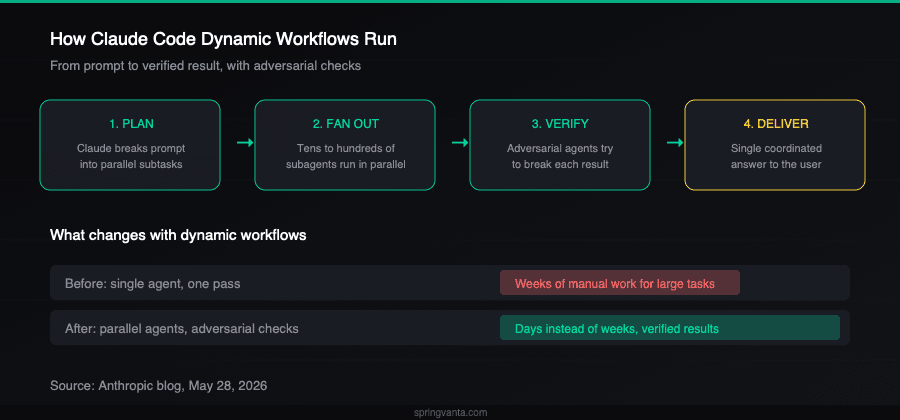
When you trigger a workflow, Claude writes an orchestration script on the fly. It breaks your task into subtasks, fans them out across subagents running in parallel, checks results before folding them back in, and iterates until the answers converge. Some agents work the problem. Other agents try to break what the first group found.
The headline demo: Jarred Sumner used dynamic workflows to port Bun from Zig to Rust. Roughly 750,000 lines of Rust, 11 days from first commit to merge, 99.8% of the existing test suite passing. One workflow mapped Rust lifetimes for every struct field. The next wrote every .rs file as a behavior-identical port, hundreds of agents working in parallel with two reviewers per file. An overnight cleanup pass addressed unnecessary data copies and opened individual PRs.
Klarna and CyberAgent used it during early access. Klarna's senior engineering manager Alessio Vallero said the tool found dead code and cleanup opportunities that traditional static analysis missed. CyberAgent's lead systems engineer Ken Takao said it fills the gap between firing a single subagent and building a full agent team.
Workflows can run for hours or days. Progress is checkpointed, so an interrupted job picks up where it left off. There is a cost warning: workflows consume substantially more tokens than a normal session. The first time one triggers, Claude Code shows what is about to run and asks for confirmation.
To start one, you either ask Claude directly ("Create a workflow") or turn on a setting called ultracode, accessible through the effort menu. Ultracode sets effort to "xhigh" and lets Claude decide when a task warrants a workflow.
Availability: Max, Team, and Enterprise (admin-enabled) plans, plus the Claude API, Amazon Bedrock, Vertex AI, and Microsoft Foundry. Enterprise has workflows off by default at launch.
The security plugin
The same week, Anthropic released a security-guidance plugin for Claude Code. You install it from the plugin marketplace with the /plugins command. Once active, it monitors code edits, diffs, and commits in real time, flagging dangerous patterns before they reach production.
Under the hood: regex-based pattern matching covering about 25 vulnerability classes. SQL injection, command injection, XSS, hardcoded API keys and secrets, insecure deserialization, improper input validation. When it catches something, Claude suggests an inline fix in the same session. No context switch to a separate scanner.
Internal data shows a 30 to 40% reduction in security-related PR comments since the tool was introduced internally. Anthropic's broader Claude Security platform does deeper codebase-wide scanning, tracing data flows across files and running adversarial verification passes, but the plugin handles the real-time catch during coding.
Why these two releases belong together
Dynamic workflows mean Claude Code can now generate a lot of code very fast. The Bun rewrite ported 750K lines in 11 days. That speed creates a new problem: more code means more surface area for vulnerabilities, and less time per line for human review.
The security plugin is a partial answer. It catches the most common classes of mistakes at the point of writing. It is not a substitute for a real security review. But it shifts some of the checking left into the coding session, which matters when an agent is generating hundreds of files in parallel.
For teams running AI coding agents in production, speed and safety are both part of the actual product. Anthropic seems to have figured this out.
What to try first
If you are on a Max or Team plan, dynamic workflows are on by default. Start with a scoped task: a bug hunt across a single service, or a migration for one small module. Watch the token usage. Workflows are expensive relative to normal sessions.
Install the security plugin from /plugins. It costs nothing extra and it runs in the background.
If you are evaluating AI coding tools for a team, the question is no longer just "which agent writes better code?" It is "which agent can handle large-scale work while also keeping that work from creating more problems than it solves?" Dynamic workflows plus built-in security scanning is one answer. It is early, and the caveats are real: workflows are research preview, and the plugin catches 25 classes but not everything.
Sources: