The Desktop Agent Race: Claude Code and Codex Both Shipped Autonomous Agents This Week
Claude Code Agent View and Codex desktop control both landed within days. Here is what changed, how they compare, and what teams should pick.
By Springvanta
Something shifted this past week in AI developer tooling, and it is not subtle. Anthropic and OpenAI both shipped autonomous background agent capabilities within days of each other, and neither product looks much like the coding assistant it was two months ago.
Claude Code now has Agent View, a full dashboard for managing parallel AI coding sessions from one terminal screen. OpenAI Codex now controls Mac desktop applications directly, watches your screen to build ambient memory, and runs tasks from your phone. Both can loop autonomously until a task finishes. Both use MCP as their tool-connectivity standard. The overlap is not coincidental.
What Claude Code shipped
Anthropic released ten versions of Claude Code between May 11 and May 22, starting with v2.1.139. The headliners:
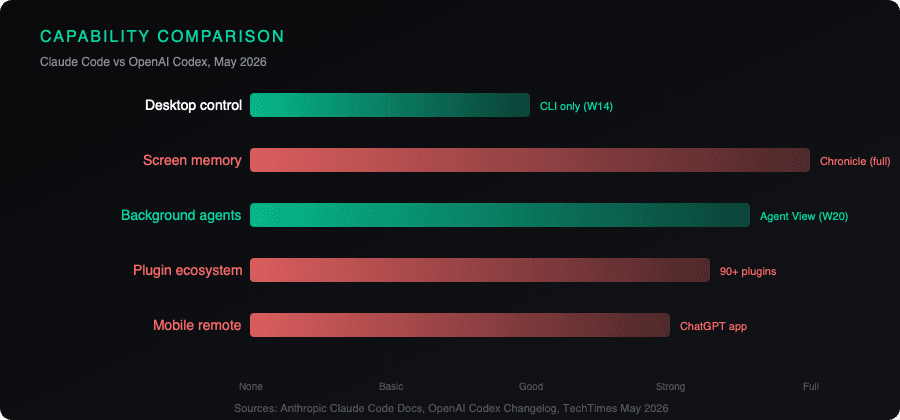
Agent View runs claude agents and opens a live dashboard of every Claude Code session. You can dispatch a bug fix, a PR review, and a test investigation as three parallel rows, keep working in another window, and jump in only when a row needs input. Pinned sessions survive idle periods and auto-restart after updates. The left-arrow key backgrounds any session and returns to the list.
The /goal command sets a completion condition, and Claude keeps working across turns until a fast model confirms the condition holds. Example: /goal all tests in test/auth pass and the lint step is clean. Claude loops autonomously, running tests, fixing failures, and only stops when both conditions are met. It works in interactive mode, -p pipe mode, and Remote Control.
Fast mode upgraded to Opus 4.7 by default (2.5x speed at the same per-token price). /code-review replaced /simplify with effort levels and GitHub PR comment support. The Workflow tool (opt-in via CLAUDE_CODE_WORKFLOWS=1) adds deterministic multi-agent orchestration.
The security hardening in v2.1.149 is worth noting separately. Anthropic fixed a PowerShell permission bypass where built-in cd functions could change the working directory undetected, a git worktree sandbox escape that covered the entire repo root instead of just the shared .git directory, and stale variable tracking for PWD/OLDPWD across directory changes. When you are giving an AI agent write access to your filesystem, these fixes matter more than any feature.
What OpenAI Codex shipped
OpenAI's transformation is more dramatic because the starting point was more constrained. The original Codex, launched May 2025, ran in an isolated cloud sandbox with no local desktop access. In six weeks this spring, it became something closer to a general-purpose desktop agent.
On April 16, OpenAI added computer-use capabilities. Codex now operates a Mac's mouse and keyboard inside any application, not just those with APIs. It runs multiple background tasks simultaneously without interrupting foreground work. A plugin catalog with 90+ integrations includes Atlassian Rovo, CircleCI, GitLab Issues, Microsoft Suite, and Render. Each plugin pairs a reusable Skill (an instruction-and-script bundle) with an MCP-based app connector. Skills can run on daily or weekly automated schedules.
Four days later, Chronicle arrived. Background agents periodically capture screenshots, extract text via OCR, and store summaries as local Markdown files. When you say "fix this" or "continue what I was working on yesterday," Codex reads those stored memories instead of making you re-explain. OpenAI's own documentation lists the trade-offs: Chronicle "uses rate limits quickly, increases risk of prompt injection, and stores memories unencrypted on your device." The prompt injection risk is not theoretical. Chronicle reads everything on screen, including webpages with hidden instructions.
On May 14, Codex went mobile. The ChatGPT app on iOS and Android now shows a live view of Codex sessions running on your paired desktop. Terminal output, file diffs, screenshots, and pending approval requests all appear on the phone. You can approve commits or reject specific changes remotely. Code stays on the host machine; only outputs cross the wire.
The convergence angle
Here is what makes this week different from normal product competition. Both platforms arrived at the same set of capabilities from different directions.
Claude Code started as a terminal tool and is pushing toward the desktop. Codex started as a sandboxed cloud runner and is pushing toward the local machine. Both now have autonomous looping (Claude's /goal, Codex's scheduled Skills). Both have mobile approval workflows (Claude's push notifications and remote control, Codex's ChatGPT app integration). Both use MCP as their tool-connectivity layer. Both treat background operation as a first-class mode, not an afterthought.
The architectural differences still matter. Claude Code keeps agents in your terminal with optional cloud plans and reviews. Codex moved from a cloud sandbox to local desktop control, which gives it broader reach (any Mac app, not just terminal tools) but also a bigger attack surface. The Chronicle feature, in particular, creates risks that Claude Code's design avoids by not capturing ambient screen content at all.
GPT-5.5, which became Codex's default model on April 23, scored 82.7% on Terminal-Bench 2.0 (OpenAI's highest agentic coding benchmark). Claude Code's fast mode runs Opus 4.7. The benchmark comparison is not straightforward because the tests weight different things, but neither model is clearly dominant right now.
What this means for teams evaluating AI tooling
If you are choosing between these platforms for a team, the decision matrix has changed.
Pick Claude Code if your workflow is terminal-centric and you want tighter security boundaries. The Agent View dashboard, /goal autonomous loops, and /code-review with GitHub integration give you a coherent background-agent system without exposing your desktop. The v2.1.149 security fixes show Anthropic taking sandbox integrity seriously.
Pick Codex if you need the agent to operate beyond the terminal: testing UIs in native apps, navigating browsers, or running scheduled tasks that touch non-code tools. The plugin ecosystem and Chronicle memory give it broader reach, but you need to accept the privacy and security trade-offs that come with ambient screen capture and unencrypted local memory files.
Pick both if you can. The MCP standard means tool integrations you build for one increasingly work with the other. The cost of hedging your bet is lower than it was three months ago.
What neither platform has proven yet is reliability at scale. Autonomous background agents that loop until a condition holds sound great in a demo. In practice, they drift, hallucinate file paths, and occasionally make changes that pass tests but miss the point. The teams that get value from these tools are the ones that treat the autonomous mode as a force multiplier for well-defined tasks with verifiable end states, not as a replacement for human review.
Sources:
- Claude Code What's New, Week 20 (Anthropic, primary)
- Claude Code v2.1.146 release notes (GitHub, primary)
- Claude Code v2.1.149 changelog (Anthropic, primary)
- OpenAI Codex desktop agent coverage (TechTimes, independent)
- Codex Chronicle privacy analysis (The Next Web, independent)
- Codex mobile integration (9to5Mac, independent)